Spreadsheet template
$14 onceFreelance Invoice & Quote Template
Send an invoice that adds itself up, then see at a glance who has paid and who is late.
Fill in the client, the line items, and your rate. Subtotal, discount, tax, and total calculate as you type. Your business details come from one settings tab, so you enter them once and they appear on every invoice and quote you send after that. The tracker is the part people underrate: it keeps a running total of what you have invoiced, what has landed, and what is overdue.
- Download starts right after checkout
- Excel, Google Sheets, LibreOffice, Numbers
- Refunded if a total comes out wrong
Every tab in the file
What you are actually buying, sheet by sheet.
The workbook has 6 tabs. Here is what each one does, in the order you meet them.
- Start Here
What to fill in first and in what order. One page.
- Invoice
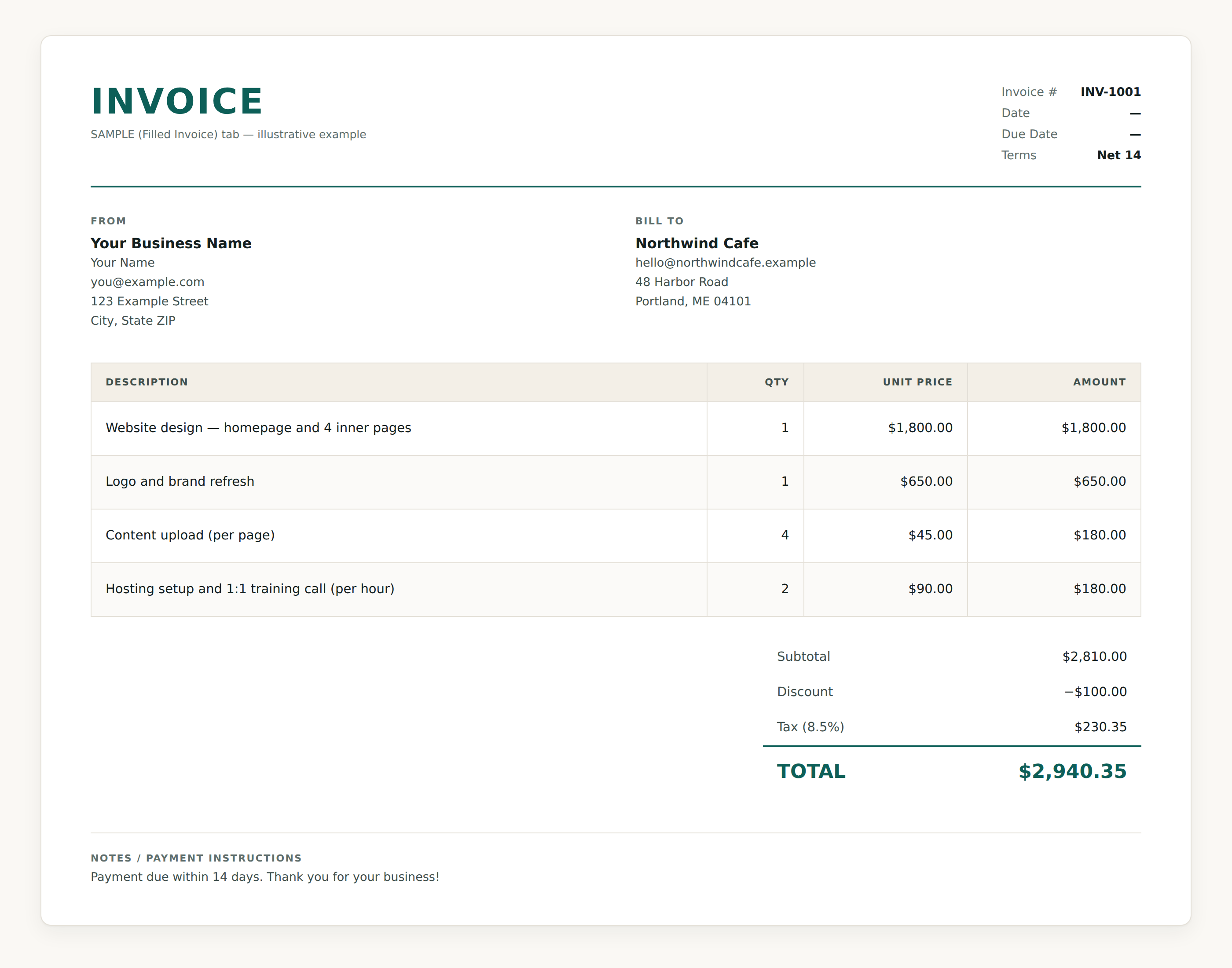
A printable invoice with 12 line item rows. Enter a quantity and a unit price and the amount appears. Subtotal, discount, tax, and total sit underneath and update as you type. The tax line even relabels itself with whatever rate you set.
- Quote
The same layout with a quote number and a valid until date instead of a due date. Send the quote first, and when the client says yes, copy the lines across.
- Invoice Tracker
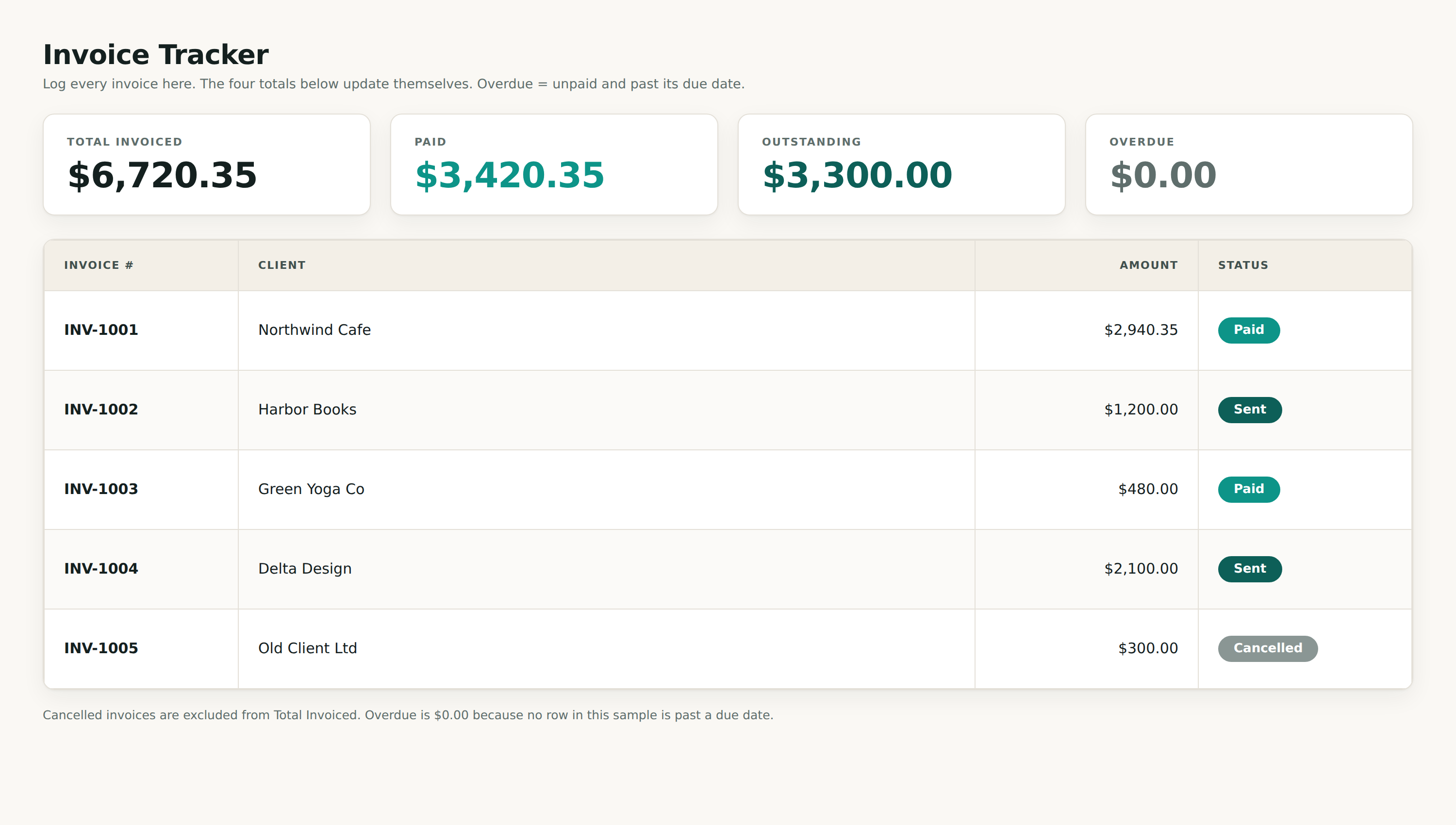
A log for up to 200 invoices with four totals that keep themselves current: total invoiced, paid, outstanding, and overdue. Overdue counts anything unpaid whose due date has already passed, so you find out before the client mentions it.
- SAMPLE (Filled Invoice)
A finished invoice for a made up cafe: four line items, $2,810.00 of work, $100.00 off, 8.5% tax, $2,940.35 total. A small worked tracker sits below it. Delete the tab when you have seen enough.
- Settings
Your business name, contact details, address, tax rate, and the note that prints at the bottom of every invoice. Fill it in once.
Shown working
The real file, with the sample data it ships with.
These are renderings of the workbook you download. The numbers come out of the sample tab inside it, so what you see below is arithmetic the file performed rather than a mock-up we drew.
Specifics
What is in the box, precisely.
- Six tabs: Start Here, Invoice, Quote, Invoice Tracker, a filled sample, and Settings
- 12 line items on the invoice and 12 on the quote, priced by quantity and unit rate
- Subtotal, a discount you type in, tax at your rate, and the total, all calculated
- Your business details live in Settings and flow onto every invoice and quote
- A tracker for up to 200 invoices with live totals for invoiced, paid, outstanding, and overdue
- Five statuses to pick from, and overdue works itself out from the due date
Who buys this
- Freelancers who bill clients directly and want the document to look the part
- Solo operators tired of rebuilding an invoice in a word processor every time
- Anyone who has lost track of which invoices actually got paid
- People who would rather not pay monthly for invoicing software
Invoice & Quote Template, $14, yours to keep.
One file, downloaded straight after checkout. If it will not open or a total comes out wrong, reply to your receipt and we refund you.
Still deciding? Read the FAQ