Skip to content
Overdesk

Spreadsheet tools for freelancers

Know what you made, what you spent, and who still owes you.

Two finished spreadsheets for freelancers who invoice their own clients. The formulas are already written and tested, and each file arrives with a filled sample year, so you can watch the totals work before you trust them with your own numbers.

Buy once and keep the file. Opens in Excel, Google Sheets, LibreOffice, and Numbers. There is no subscription and nothing to sign into.

Dashboard · Freelancer Income & Expense Tracker
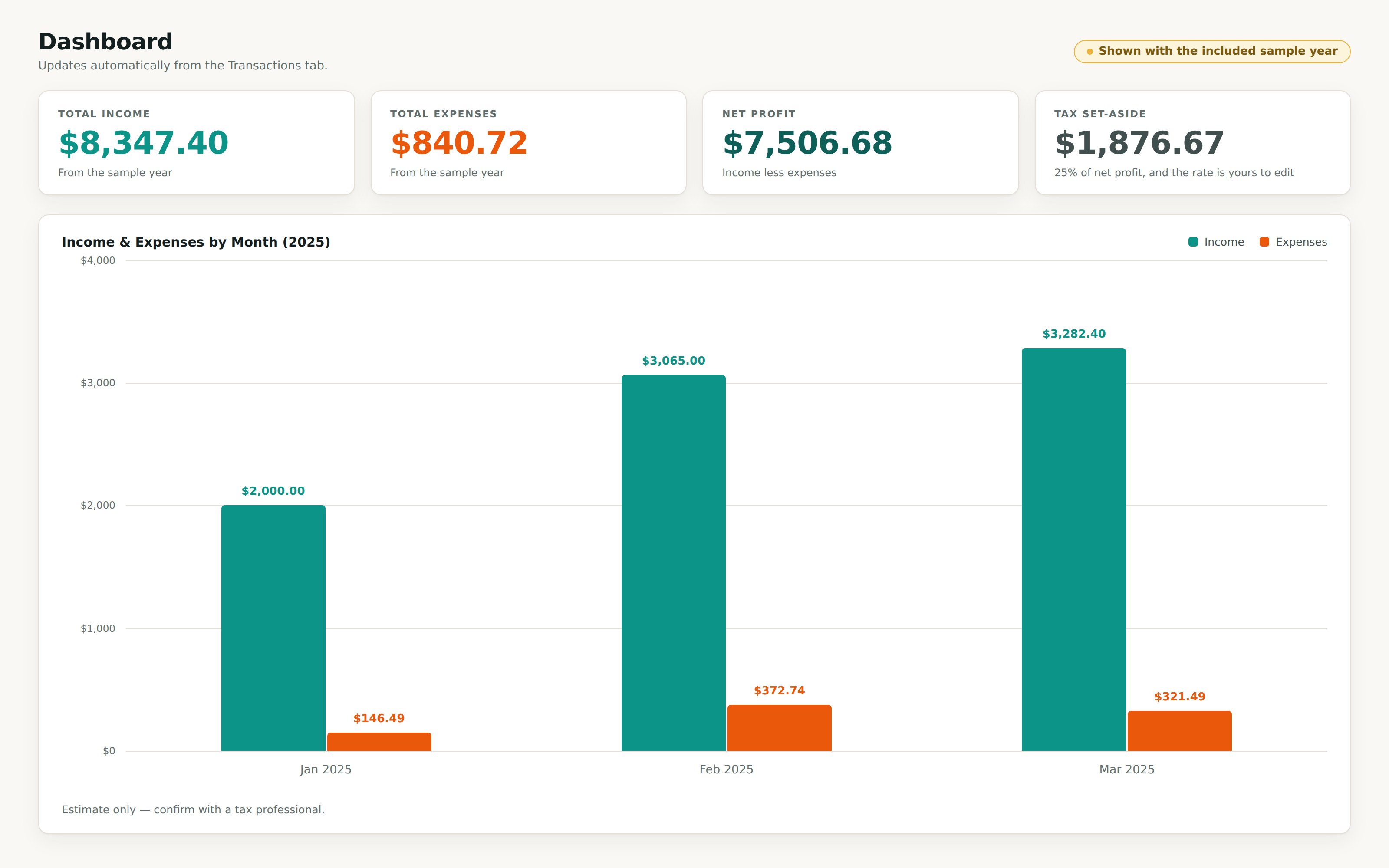
The Dashboard tab showing four totals (total income $8,347.40, total expenses $840.72, net profit $7,506.68, tax set-aside $1,876.67) above a monthly income versus expenses bar chart for January, February, and March.

The dashboard, running on the sample year included in the file.

The part nobody enjoys

Freelancing is the job. The bookkeeping is the tax on the job.

  • Your income is scattered across Stripe, PayPal, bank transfers, and a couple of invoices you are fairly sure you sent.

  • Tax time means digging through a shoebox of receipts and guessing at deductions you probably qualify for.

  • You have chased a client for money using a document that does not add up its own total, and still got paid late.

None of this needs accounting software with a monthly bill attached. It needs one file that already does the arithmetic and remembers what counts as an expense.

The maths behind the price

Fifteen dollars against the numbers it is up against.

goes unclaimed in deductions each year by the average freelancer doing their own books

$8,000 to $12,000

goes unclaimed in deductions each year by the average freelancer doing their own books

a year spent maintaining a homemade budget spreadsheet, before any actual bookkeeping

About 40 hours

a year spent maintaining a homemade budget spreadsheet, before any actual bookkeeping

of freelancers get paid late at least some of the time

85%

of freelancers get paid late at least some of the time

Those three figures come from published research on freelance tax, invoicing, and time use. They describe the market, not our customers. Overdesk does not file your taxes and cannot promise you any of that money back. It keeps your numbers somewhere you can see them.

What you get

Two files. Both finished before you open them.

Every screenshot on this site is the actual workbook you download, shown with the sample data that ships inside it.

The Dashboard tab showing four totals (total income $8,347.40, total expenses $840.72, net profit $7,506.68, tax set-aside $1,876.67) above a monthly income versus expenses bar chart for January, February, and March.

Log what you earn and what you spend. The totals, the monthly trend, and your tax set-aside work themselves out.

  • Five tabs: Start Here, Dashboard, Transactions, a filled sample year, and editable Categories
  • A 500 row ledger with dropdowns for type, category, and payment method
  • 19 categories built in, 6 for income and 13 for expenses, all renameable
  • The dashboard totals income, expenses, net profit, and a tax set-aside you control
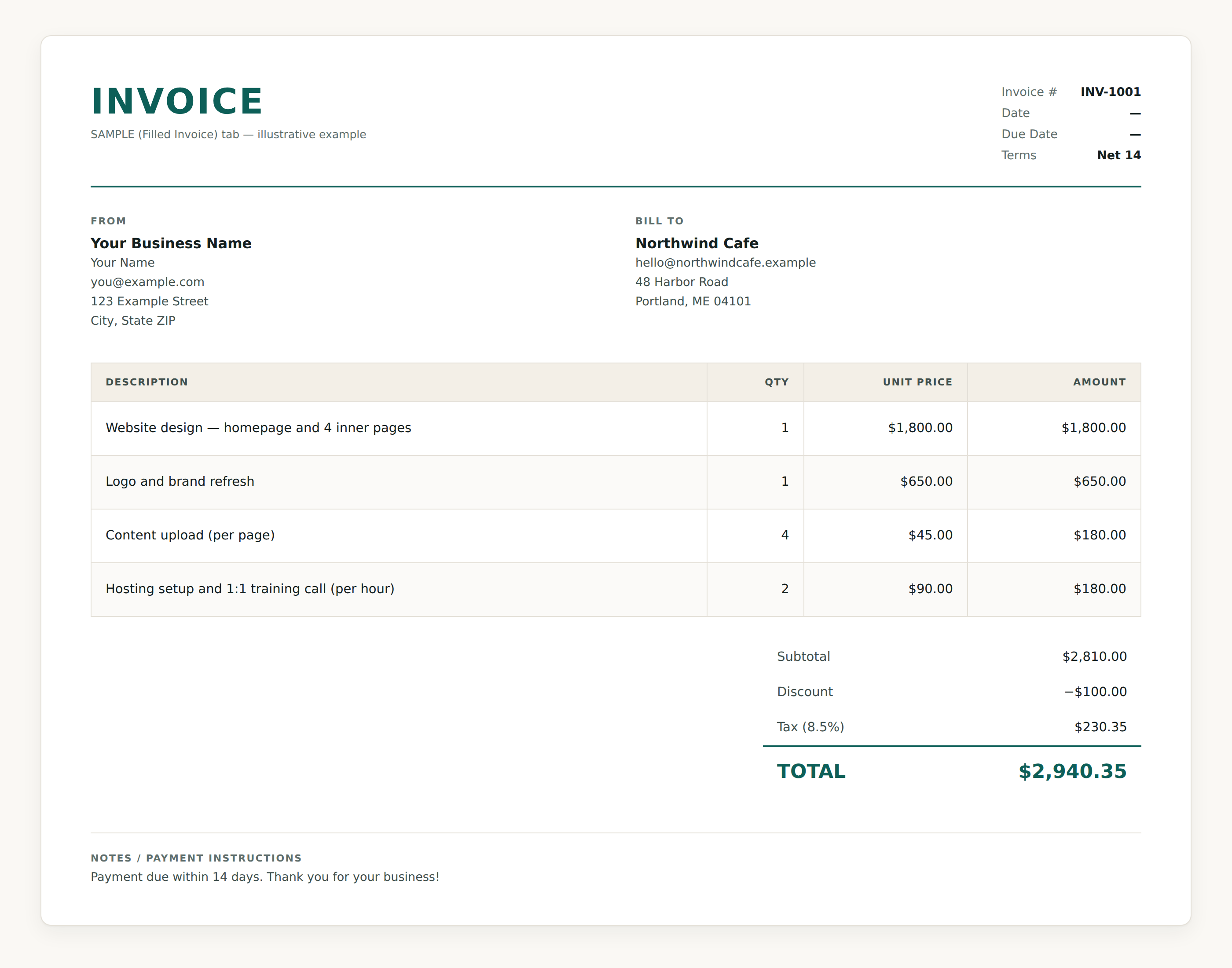
The sample invoice tab showing a billed client, four line items, and a subtotal of $2,810.00 with a $100.00 discount, 8.5% tax of $230.35, and a total of $2,940.35.

Send an invoice that adds itself up, then see at a glance who has paid and who is late.

  • Six tabs: Start Here, Invoice, Quote, Invoice Tracker, a filled sample, and Settings
  • 12 line items on the invoice and 12 on the quote, priced by quantity and unit rate
  • Subtotal, a discount you type in, tax at your rate, and the total, all calculated
  • Your business details live in Settings and flow onto every invoice and quote

How it works

Three steps, then it is yours.

  1. 1.Pick the file you need

    The tracker if you want to know where the money went. The invoice template if you want to get paid on time. Both if you are running the whole thing yourself.

  2. 2.Pay once through Polar

    Polar is our merchant of record, so sales tax and VAT are handled properly wherever you are. The download starts straight after checkout.

  3. 3.Open it and start typing

    There is nothing to install and no account to create. Open the sample tab, see the totals add up, then delete it and put your own numbers in.

Before you buy

The questions people actually ask.

Read every answer

A free template still costs you the afternoon it takes to wire up the formulas and find out whether they hold when you change a number. Plenty of them break the moment you do. These arrive finished, with a filled sample year sitting in the file so you can watch the maths run before you type anything of your own. If you bill $30 an hour or more, the afternoon is worth more than the file.

Buy the file once and stop thinking about it.

If a file will not open or a total comes out wrong, reply to your receipt and we refund you.