Spreadsheet template
$15 onceFreelancer Income & Expense Tracker
Log what you earn and what you spend. The totals, the monthly trend, and your tax set-aside work themselves out.
One workbook that turns a year of scattered payments and receipts into a number you can actually look at. You type a date, a category, and an amount. The dashboard handles the rest, and it breaks your spending out by category so the deductible things stay visible instead of getting lost in a bank statement.
- Download starts right after checkout
- Excel, Google Sheets, LibreOffice, Numbers
- Refunded if a total comes out wrong
Every tab in the file
What you are actually buying, sheet by sheet.
The workbook has 5 tabs. Here is what each one does, in the order you meet them.
- Start Here
Plain instructions for the whole workbook. Read it once and you are done with setup.
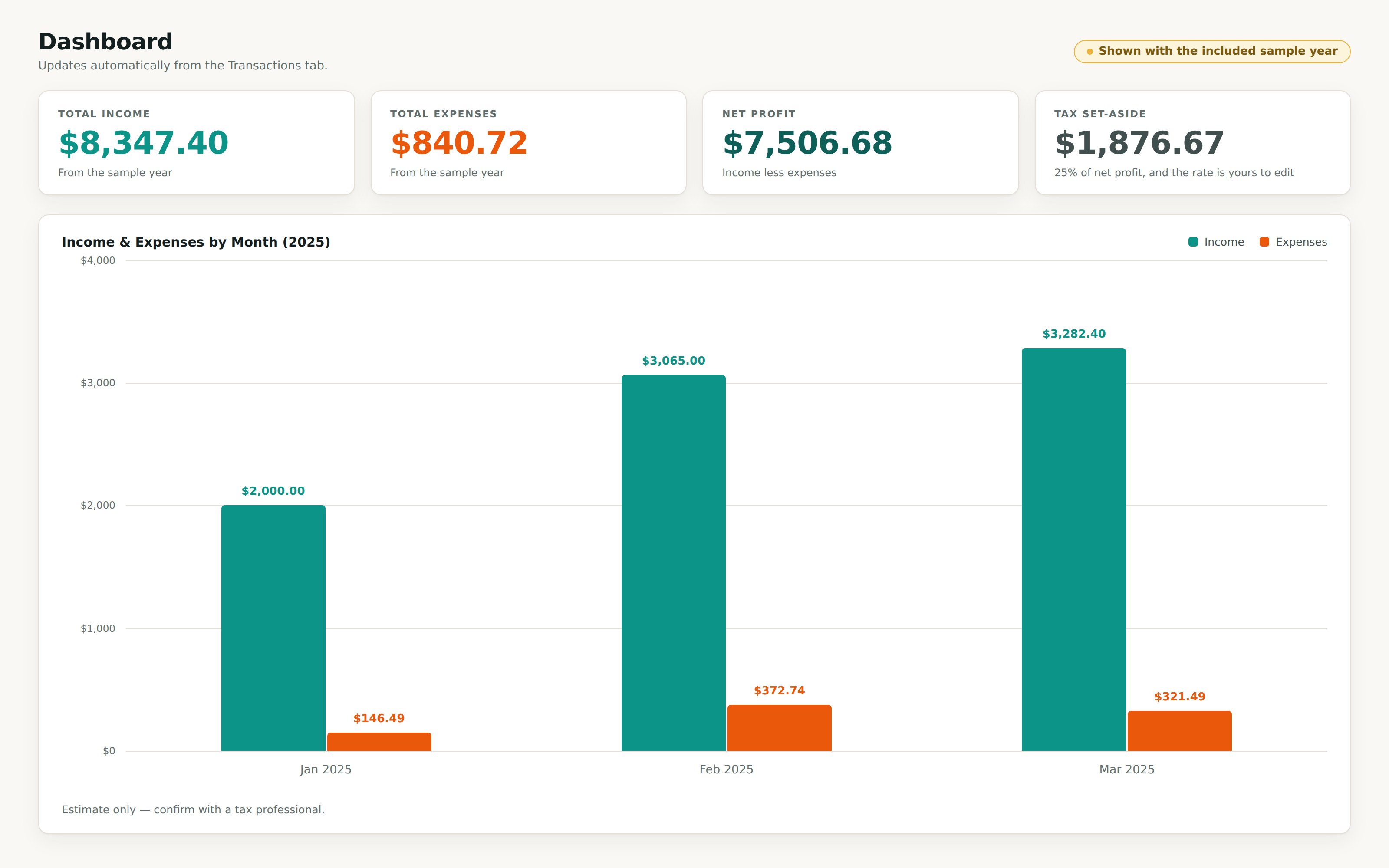
- Dashboard
Four totals at the top: income, expenses, net profit, and tax to set aside. Under them, a month by month table for the year you choose and a breakdown of expenses across all 13 categories. You never build a formula. It reads the Transactions tab and updates when you type.
- Transactions
Your ledger, 500 rows, eight columns: date, type, category, description, amount, payment method, client or vendor, and notes. Type, category, and payment method are dropdowns, so your spelling stays consistent and the totals keep working.
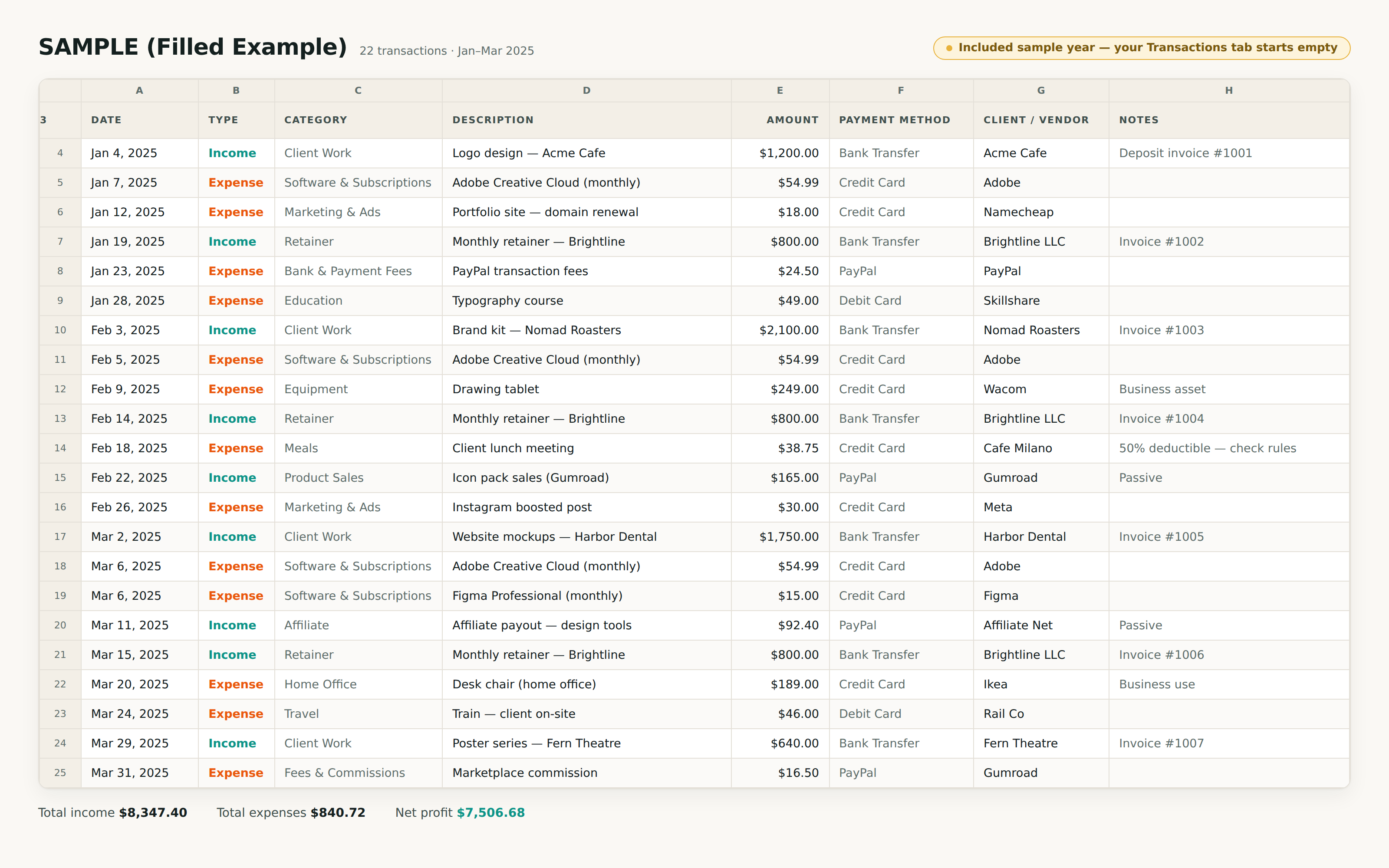
- SAMPLE (Filled Example)
A worked quarter for a made up freelance designer, 22 transactions from January to March 2025, adding up to $8,347.40 in income and $840.72 in expenses. It sits on its own tab so you can see the maths run correctly before you trust it. Delete it whenever you want.
- Categories
The lists behind every dropdown. Rename Client Work to whatever you call it, add categories your work needs, and the ledger and dashboard follow.
Shown working
The real file, with the sample data it ships with.
These are renderings of the workbook you download. The numbers come out of the sample tab inside it, so what you see below is arithmetic the file performed rather than a mock-up we drew.
Specifics
What is in the box, precisely.
- Five tabs: Start Here, Dashboard, Transactions, a filled sample year, and editable Categories
- A 500 row ledger with dropdowns for type, category, and payment method
- 19 categories built in, 6 for income and 13 for expenses, all renameable
- The dashboard totals income, expenses, net profit, and a tax set-aside you control
- Income and expenses by month for any year you point it at, plus a chart
- Expenses split across all 13 categories so you can see where the money went
Who buys this
- Freelancers and contractors who invoice their own clients
- Anyone filing self-employment income who wants deductible expenses written down somewhere
- Sellers and creators with income landing in more than one place
- People who want a spreadsheet, not an accounting app with a login
Income & Expense Tracker, $15, yours to keep.
One file, downloaded straight after checkout. If it will not open or a total comes out wrong, reply to your receipt and we refund you.
Still deciding? Read the FAQ